
In many manufacturing and lab environments, reporting is done after the fact rather than in real time.
A common scenario is a Monday morning review where teams need to evaluate how production performed at the end of the previous week. Friday data is often the focus, representing final production runs, last shipments, or end-of-week quality checks.
Quality Window allows you to isolate this data quickly using a calculated variable and filters. This can be done either as a one-time filter or saved as a View for repeated use.
Step 1: Create a Day-of-Week Variable
In QW Admin:
- Open your application
- Add a new Calculated variable
- Set the formula to:
@DOW[]
This function returns a numeric value from 1 to 7:
- 1 = Sunday
- 2 = Monday
- 3 = Tuesday
- 4 = Wednesday
- 5 = Thursday
- 6 = Friday
- 7 = Saturday
![@DOW[] function in variable Calculation Editor](https://busitech.com/wp-content/uploads/2014/07/image-19.png)
Step 2: Filter for Last Friday
In Quality Window Apply the following filters:
Date Filter:
- From: Beginning of Previous Week
- To: End of Previous Week
Variable Filter:
- Set your calculated DOW variable equal to 6 (Friday)
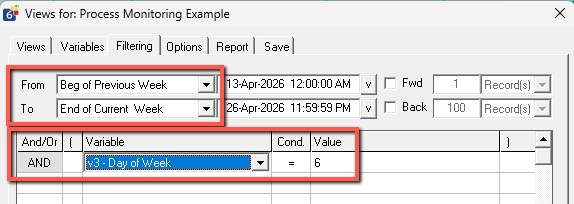
Result
This will return only the records from the previous Friday when run on Monday.
You can:
- Apply this as a temporary filter when needed
- Save it as a View for repeatable reporting
Related Resources
- Filtering Data
- Calculated Variables using Formulas’ and @Functions Reference Guide
- Views – An introduction
- Views – Creating Reports
- Temporary View or Filter Detected — Why Record Creation Is Disabled
- Pivoting and Summarizing Data in Quality Window Views
- How Do I Calculate the Time Difference Between 2 Variables?
- Create Date or Time Variables