
A protected variable is a read-only variable that prevents users from editing its value during data entry. This is typically used when values are automatically populated from external sources such as PLCs, RS232 devices, or input files.
When to Use Protected Variables
Protected variables are useful when:
- Data is written automatically from an external system
- You want to prevent manual changes to critical values
- The value should be visible but not editable
- You want most users to be prevented from editing a value while still allowing authorized users to make controlled corrections when necessary.
How to Set a Variable as Protected
In QW Admin:
- Open Maintain Applications
- Open the target application
- Select the variable
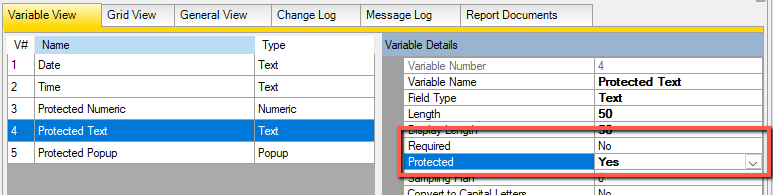
- Set the Protected property to True
- Save the application
Important Behavior
- A variable cannot be both Required and Protected
- Enabling one will automatically disable the other
- Protected variables are read-only during data entry but can still be populated by external sources or scripts
- Protected variables can be temporarily unlocked using the Protected Variable Override feature when configured by an administrator. Override activity can be recorded in security and audit logs for traceability.
Options for Allowing Edits to Protected Variables
There are two common approaches when some users need the ability to modify protected variables.
Option 1 – Use Views
Protection can be modified at the view level to support different user roles.
For example:
- Operator view → variable is read-only
- Supervisor view → variable can be edited
This approach is useful when specific groups of users consistently require different levels of access.
Option 2 – Use Protected Variable Override
Protected Variable Override allows authorized users to temporarily unlock protected variables when a correction is required.
For example:
- Operators cannot edit protected variables.
- Supervisors or quality personnel are granted override permissions.
- Protected variables remain read-only until an authorized user enables an override.
This approach allows organizations to maintain a single application and data entry experience while still providing controlled access when exceptions occur.
See Can Authorized Users Override Protected Variables? for configuration details.
Key Considerations
- Protected variables are still included in calculations, reports, and charts.
- Protection only applies to user input and does not prevent updates from external systems, scripts, or automation.
- View settings can override the application’s default protection settings.
- Protected Variable Override provides an alternative to creating separate views when occasional edits are required.
Related Resources
- Can Authorized Users Override Protected Variables?
- Using Input Files and Output Files to Set Defaults and Integrate Data
- Connecting Quality Window To External Data Sources
- Capturing data from multiple RS232 devices
- RS232 Real-Time Data Collection with Quality Window SPC Tutorial
- Input/Output Files in Quality Window: Enhancing Data Connectivity Tutorial