
Checkbox fields provide a flexible way to capture binary inputs such as pass/fail, yes/no, or condition present/not present.
They are designed for speed and simplicity, while still allowing structured data collection.
Checkboxes vs Popups
Checkboxes and popups can both be used to capture attribute-style data, but they serve different purposes.
Checkboxes:
- Best for binary (two-state) inputs
- Fast and simple for operators
- Easy to configure and maintain
- Ideal for high-frequency data entry
Popups:
- Support multiple choices (more than two options)
- Better for categorized or descriptive inputs
- Require more setup and ongoing maintenance
- Useful when the input is not strictly yes/no
If your use case is truly binary, a checkbox is usually the better option. If you need more than two choices, a popup is the appropriate tool.
Why Use a Checkbox Field
Checkboxes simplify data entry while maintaining structure behind the scenes.
They can be used for:
- Defect tracking
- Audit checks
- Operator confirmations
- Report-friendly inputs
They also allow you to control how values are stored and displayed.
How Checkbox Fields Work
Checkboxes are configured using the CHECKBOX[...] format in the Unit of Measure.
Examples:
CHECKBOX[1,0]CHECKBOX[Y,N]CHECKBOX[Green,Red]
The values inside the brackets define what is returned when the box is checked or unchecked.
You are not limited to standard values. You can define values that match your use case, such as:
CHECKBOX[1,-1]CHECKBOX[100,0]
Field Setup Considerations
The variable length should match the values being returned.
- Short values (1, 0, Y, N) can use a smaller field length
- Longer values (Green, Red) require a larger field length
Ensure the field can store the full value without truncation.
Two Common Approaches
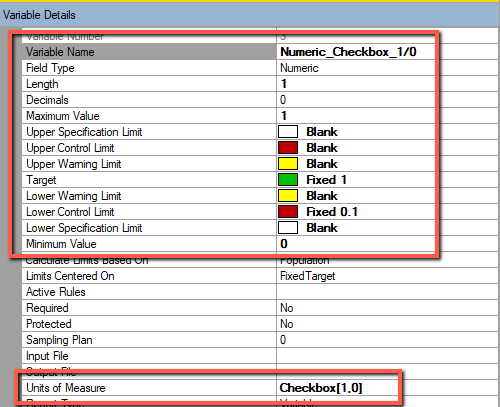
Numeric Checkboxes (for Analysis)
Numeric type configurations are used when the data will be analyzed.
Examples:
CHECKBOX[1,0]CHECKBOX[1,-1]CHECKBOX[100,0]
These support:
- Limits
- Rules
- Charts
- Statistical summaries
Example configuration:
- Target = 0
- UCL = 0.5
- USL = 0.9
This allows checked values to be treated as conditions or violations.
Text-Based Checkboxes (for Readability)
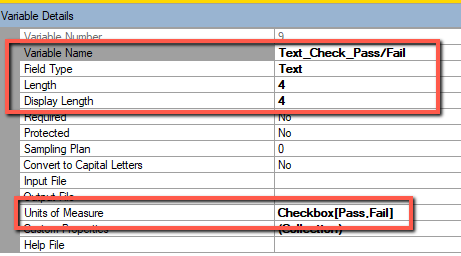
Text type configurations are used when clarity is more important than analysis.
Examples:
CHECKBOX[Y,N]CHECKBOX[Pass,Fail]CHECKBOX[Accepted,Rejected]
These are commonly used for:
- Operator-facing screens
- Certificates of Analysis
- Reports and documentation
These configurations are not intended for limits, rules, or charting.
Naming Best Practices
Checkbox variables should clearly communicate what a checked value represents.
Examples:
- Bubbles Found?
- Label Applied?
- Seal Intact?
This ensures consistent interpretation during data entry.
Data Entry Experience
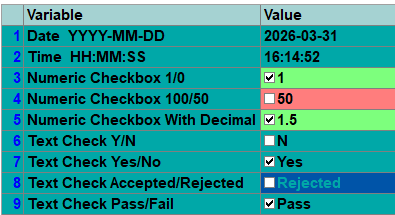
Users simply check or uncheck the box.
- Checked returns the first value
- Unchecked returns the second value
Key Takeaways
- Checkboxes are ideal for simple binary input
- Popups should be used when more than two choices are required
- Checkbox values are fully customizable
- Numeric configurations support analysis and charting
- Text configurations improve readability for reports
- Field length must match the defined values