
A Certificate of Analysis (COA) is an important component of manufacturing processes and continuous improvement efforts. It provides documented evidence that product results meet defined specifications and allows organizations to communicate quality results to customers with confidence.
Quality Window supports the collection, validation, and reporting of manufacturing data, making it well-suited for generating COAs directly from production results.
COAs are generated using validated data, ensuring that results reflect actual production conditions and meet customer expectations. This eliminates the need for manual data handling and helps maintain consistency across batches and reports.
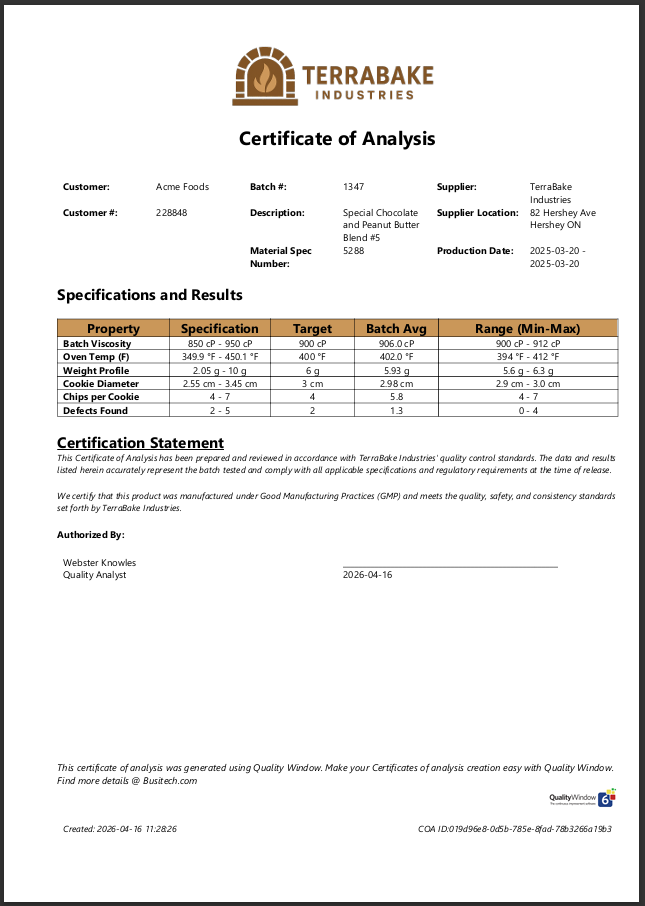
Get Started Creating Your Certificate of Analysis
COAs in Quality Window are generated by selecting the appropriate dataset and applying a report or document template to produce a customer-ready output.
This process allows you to:
- Control which data is included (batch, lot, time range, or filtered dataset)
- Ensure results align with defined specifications
- Generate consistent, repeatable COA documents
For a step-by-step guide on generating COAs, see:
Creating Certificates of Analysis (COAs) with Quality Window
Controlling COA Data and Output
COAs are built from selected datasets, allowing users to define exactly what information is included in each document.
This includes:
- Selecting specific batches or production runs
- Filtering records based on process or inspection criteria
- Ensuring only relevant and approved data is included
[Insert Image: Data Selection / View Filtering]
This level of control ensures that each COA accurately represents the intended scope of production data.
Consistent and Scalable COA Generation
Quality Window enables COA generation as a repeatable process, reducing the need for manual preparation.
Using templates and structured data:
- COAs can be generated consistently across products and customers
- Formatting remains standardized
- Data is pulled directly from the source without re-entry
This approach supports operations where COA generation must scale with production while maintaining accuracy and consistency.
Advanced COA Design and Customization
For more complex or highly specific COA requirements, Quality Window also supports advanced document generation approaches using scripting and external tools such as Microsoft Word or Excel.
These approaches are typically used when:
- COA layouts require highly specific formatting
- Additional calculations or conditional logic are needed
- Unique customer or regulatory requirements must be met
This provides flexibility beyond standard COA generation, allowing organizations to support both standardized and highly customized reporting workflows.
Beyond Certificates of Analysis
Creating COAs is one part of a broader quality and process monitoring workflow. Quality Window is also used for:
- Process monitoring and control
- Data collection and validation
- Statistical analysis and reporting
Explore additional applications and examples in our Sample Applications Tutorials.
Learn More or Get Started
If you are looking to improve how Certificates of Analysis are generated and managed in your operation, there are a couple of ways to get started.
You can explore how COAs are created step-by-step using Quality Window in the following guide:
Creating Certificates of Analysis (COAs) with Quality Window
If you would like to see how this would work with your own processes and data, you can start a 30-day trial or reach out to discuss your requirements.