
Alarm acknowledgements are often used to confirm that a condition has been reviewed and that appropriate action has been taken.
In some organizations, not every user should be permitted to acknowledge alarms. For example, alarm acknowledgement may be limited to supervisors, quality personnel, maintenance staff, or other designated users.
Quality Window allows organizations to restrict alarm acknowledgements to authorized users while still allowing operators to continue working within the application.
What is Alarm Acknowledgement Permission?
Alarm Acknowledgement Permission allows organizations to control who can acknowledge alarms that require acknowledgement.
When enabled, only users granted the appropriate permission can acknowledge qualifying alarms.
If the current user does not have permission, Quality Window can prompt for credentials from an authorized user, allowing the acknowledgement to proceed without requiring the user to sign out and back in.
Typical Use Cases
Supporting Supervisor Approval Workflows
Some organizations require a supervisor to review alarm conditions before they are acknowledged.
Alarm Acknowledgement Permission allows supervisors to authorize alarm acknowledgements while operators continue performing normal data entry activities.
Separating Alarm Response Responsibilities
Not every user is responsible for evaluating alarm conditions. Restricting alarm acknowledgements allows organizations to clearly define who is authorized to review and acknowledge alarms.
Supporting Quality and Compliance Requirements
Many quality systems require accountability regarding who reviewed and acknowledged critical events.
By restricting alarm acknowledgements to authorized users, organizations can better align alarm handling with internal procedures and compliance requirements.
Maintaining Shared Workstations
In environments where multiple employees use the same workstation, authorized users can acknowledge alarms using their own credentials without requiring other users to log out of the system.
How to Configure Alarm Acknowledgement Permissions
Alarm acknowledgement permissions require two security settings.
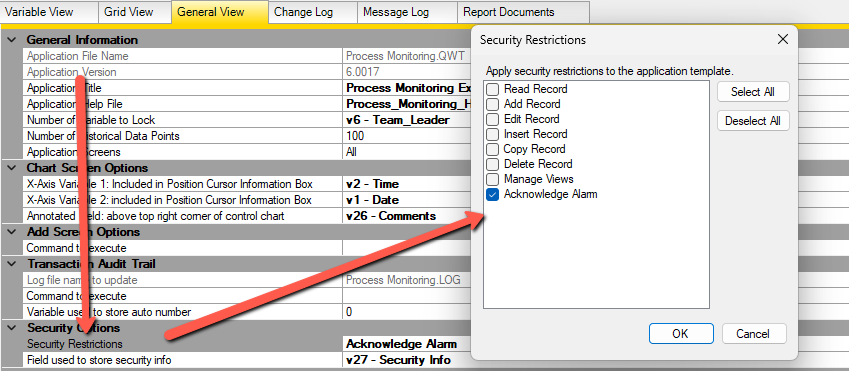
Step 1 – Enable the Application Restriction
Open the application’s security restrictions on the General View tab and enable:
Acknowledge Alarms
This restriction determines whether alarm acknowledgements require additional authorization.
Step 2 – Grant User Permission
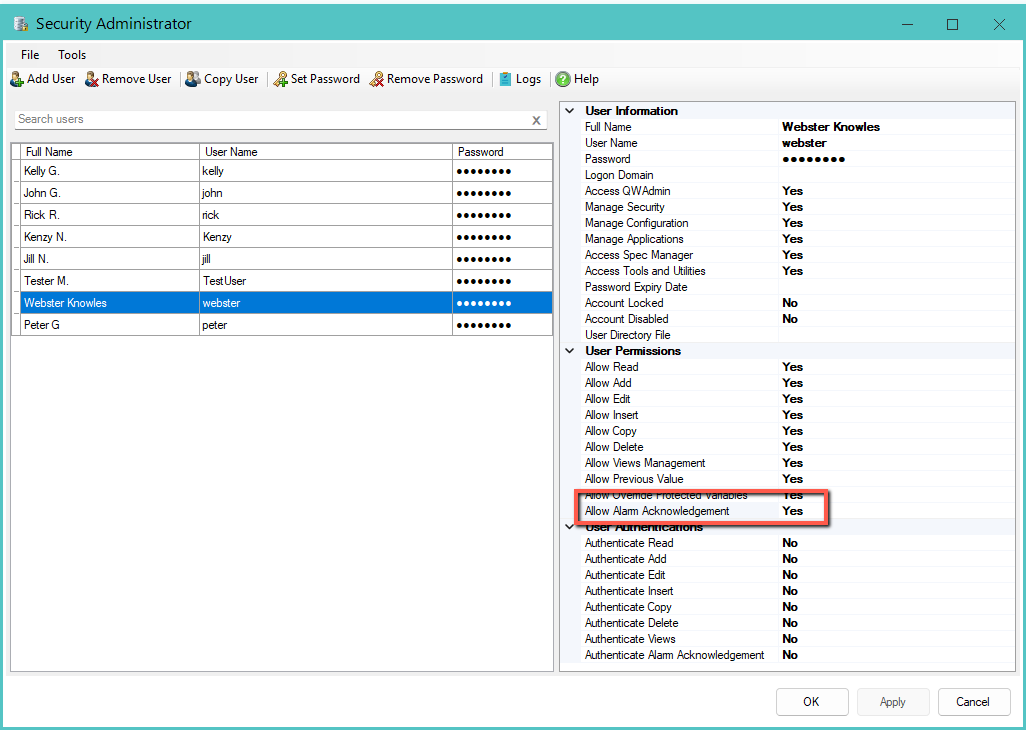
Open the user account that should be allowed to acknowledge alarms and enable:
Allow Alarm Acknowledgement
Only users granted this permission can acknowledge alarms when the restriction is enabled.
What Happens During Alarm Acknowledgement?
When a user attempts to acknowledge an alarm that requires authorization:
- Users with the appropriate permission can acknowledge the alarm normally.
- Users without permission are prompted for credentials from an authorized user.
- The authorized user can temporarily authorize the acknowledgement without requiring a workstation logoff.
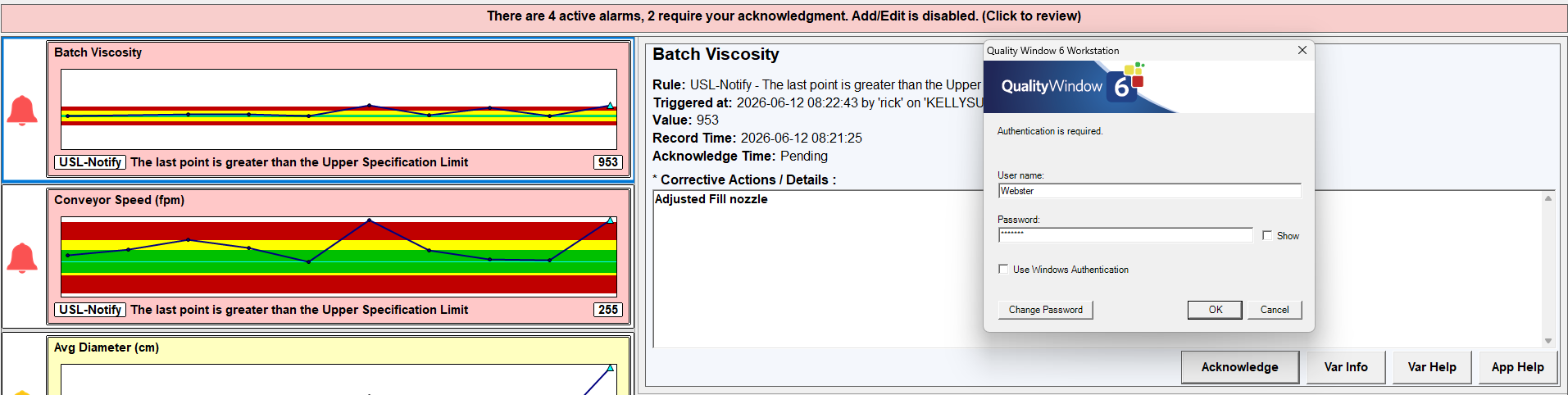
This allows organizations to maintain security controls while minimizing disruption to production activities.
Frequently Asked Questions
Can all users acknowledge alarms?
No. When the restriction is enabled, only users granted the Allow Alarm Acknowledgement permission can acknowledge alarms.
Does the operator need to log out?
No. If a user is already logged in, an authorized user can authenticate when prompted and the elevated identity is used only for the acknowledgement. Once the action is complete, the original user remains logged in.
If no user is currently logged in, the user who authenticates for the acknowledgement remains logged in after the action is completed. This behavior is consistent with the existing Quality Window security model.
Can supervisors acknowledge alarms for operators?
Yes. Any user granted the Allow Alarm Acknowledgement permission can authorize the acknowledgement.
Should I enable this restriction?
Organizations that require approval workflows, separation of duties, or additional accountability around alarm handling may benefit from enabling this restriction.
What happens if the restriction is not enabled?
Alarm acknowledgements continue to function according to the standard alarm workflow without requiring additional authorization.