
Protected variables help prevent accidental or unauthorized changes to important information. They are commonly used to lock values after data entry, review, approval, or other business processes have been completed.
However, there are situations where a legitimate correction or update is required. Rather than removing variable protection entirely, Quality Window provides a controlled method for authorized users to temporarily override protected variables when necessary.
What is Protected Variable Override?
Protected Variable Override allows designated users to edit protected variables after authenticating with their Quality Window credentials.
This capability provides flexibility when corrections are required while maintaining the protection and accountability that protected variables were designed to provide.
When a protected variable is overridden:
- The user performing the override is identified and authenticated.
- The protected variable becomes available for editing.
- The override activity is recorded for auditing purposes.
- Variable protection remains in place for all other users.
Typical Use Cases
Correcting Data Entry Errors
Even well-designed processes occasionally require corrections. Protected Variable Override allows authorized personnel to make necessary changes without removing protection from the variable for everyone else.
Supporting Exception-Based Processes
Many organizations have established workflows where certain information is protected once entered, reviewed, or approved. When an exception occurs, authorized personnel can make the required update while maintaining a record of the action.
Restricting Changes to Specific Personnel
Some information should only be modified by designated users. Protected Variable Override provides an additional layer of control by allowing only authorized users to make changes when needed.
Maintaining a Single Application Configuration
Organizations often want different levels of editing authority without creating separate applications or complex workflows. Protected Variable Override allows authorized users to make controlled changes within the same application while maintaining protection for standard users.
How to Enable Protected Variable Override
Protected Variable Override requires two security settings.
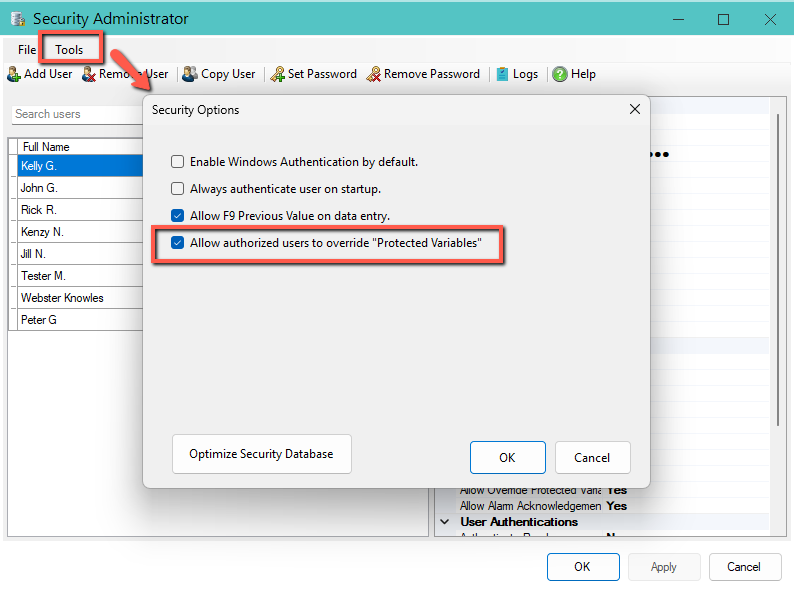
Step 1 – Enable Protected Variable Override
Open Security Administrator and select:
Tools > Security Options
Enable:
Allow authorized users to override protected variables
This setting enables the Protected Variable Override capability within the security database.
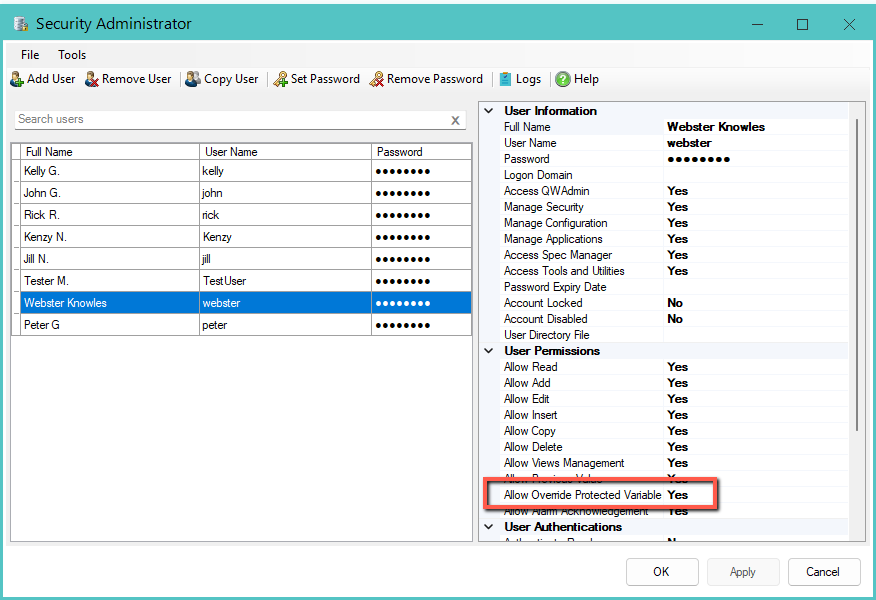
Step 2 – Grant Override Permission
Open the user account that should be allowed to perform overrides and enable:
Allow Override Protected Variable
Only users granted this permission can override protected variables.
How to Override Protected Variables
When Protected Variable Override is enabled and the current record contains one or more protected variables, the Override Protected Variables command becomes available on the data entry screen.

Selecting the command prompts the user to authenticate using credentials from a user who has been granted the Allow Override Protected Variable permission.
Once authorized, all protected variables in the current record are temporarily unlocked and become available for editing.
Quality Window clearly indicates when Protected Variable Override is active by displaying Protected – Override Enabled in the variable information area.

Protected Variable Override remains active until:
- The override command is disabled.
- The record is saved.
After the override is disabled or the record is saved, protected variables return to their normal protected state.
This approach allows authorized users to make necessary corrections without permanently changing variable protection settings for other users.
Audit Trail and Security Logging
Protected Variable Override is designed to support traceability and accountability.
When an override occurs:
- The user performing the override is recorded.
- The action is written to the Security Log.
- The action is written to the Transaction Audit Trail.
This allows organizations to review who performed the override and when it occurred.
Frequently Asked Questions
Does this remove protection from the variable?
No. The variable remains protected. Only authorized users who have been granted override permissions can temporarily override the protection.
Can any user override protected variables?
No. Users must be explicitly granted the Allow Override Protected Variable permission.
Is override activity audited?
Yes. Override activity is recorded in both the Security Log and Transaction Audit Trail.
Do I need separate views to allow certain users to edit protected variables?
Not necessarily. Protected Variable Override can provide a simpler alternative when only specific users require occasional access to protected variables.
Should I remove variable protection instead?
In most cases, Protected Variable Override is the preferred approach. It maintains protection for standard users while providing authorized personnel with a controlled method for making necessary changes.