
Alarms help organizations move beyond simply collecting data and toward actively monitoring their processes.
When data meets conditions defined by your rules, Quality Window can generate alarms that notify users, require acknowledgement, send email notifications, and create a permanent record of what occurred and how it was handled.
Whether you are monitoring product quality, process stability, laboratory testing, or operational performance, alarms help ensure important conditions receive the attention they deserve.
What Are Alarms?
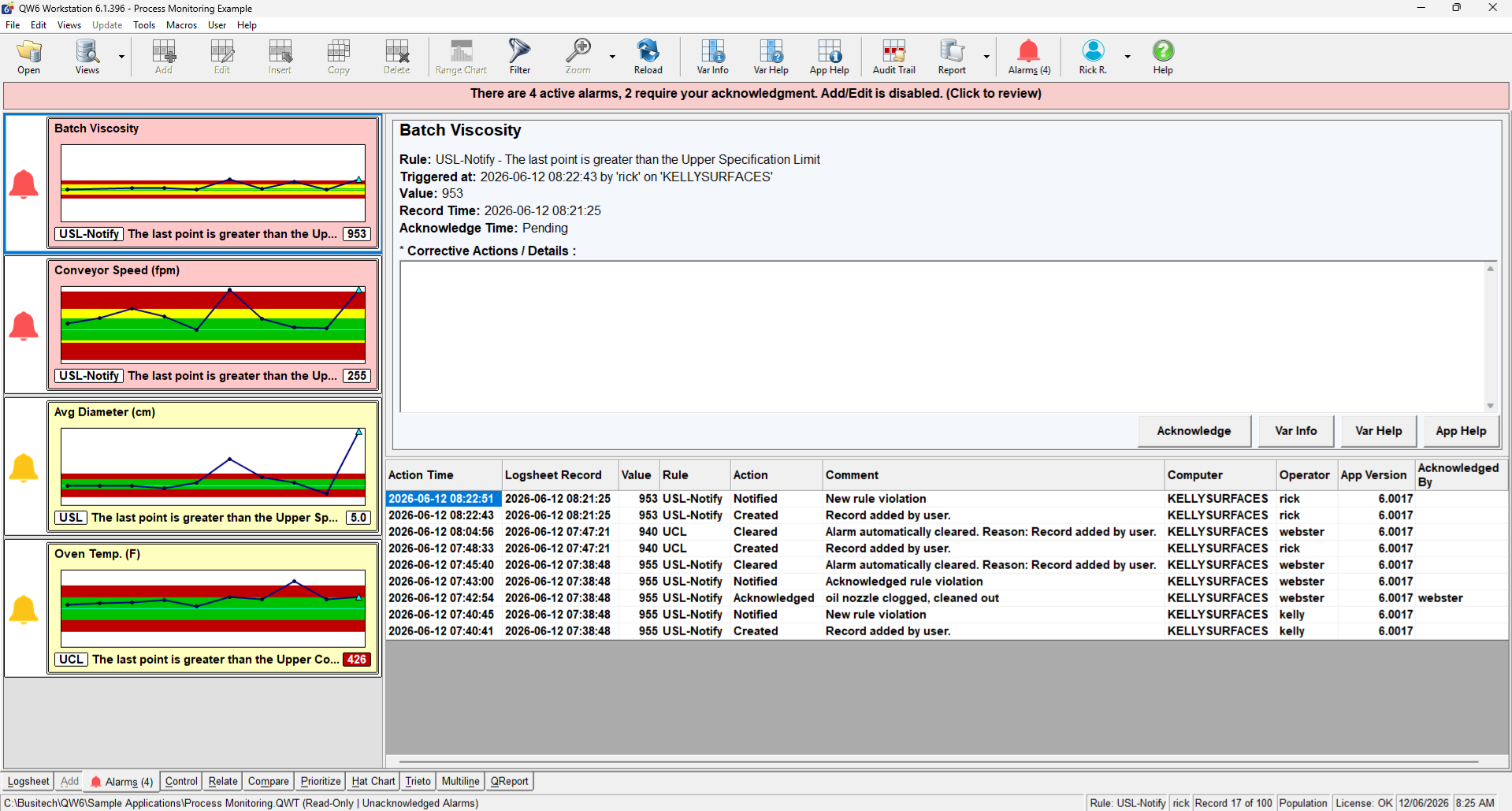
An alarm is generated when data violates a rule assigned to a variable.
Examples include:
- A measurement exceeding a specification limit.
- A point falling outside a control limit.
- A sustained trend or process shift.
- A calculated quality indicator exceeding an acceptable threshold.
When a rule is violated, Quality Window creates an alarm and records the event for future review and reporting.
Why Use Alarms?
Many organizations collect large amounts of quality and process data. The challenge is identifying when that data requires action.
Alarms help by:
- Drawing attention to important events.
- Reducing reliance on manual chart review.
- Supporting consistent operator response.
- Providing traceability for investigations and audits.
- Helping teams identify and address problems sooner.
Rather than expecting users to constantly monitor charts and reports, alarms highlight conditions that require attention.
Informational vs Required Acknowledgement Alarms
Quality Window supports two different alarm behaviors.
Informational Alarms
Informational alarms notify users that a rule has been violated while allowing work to continue normally.
These alarms are useful when users should be informed about a condition but no immediate action is required.
Required Acknowledgement Alarms
Required acknowledgement alarms are designed for conditions that require review before work continues.
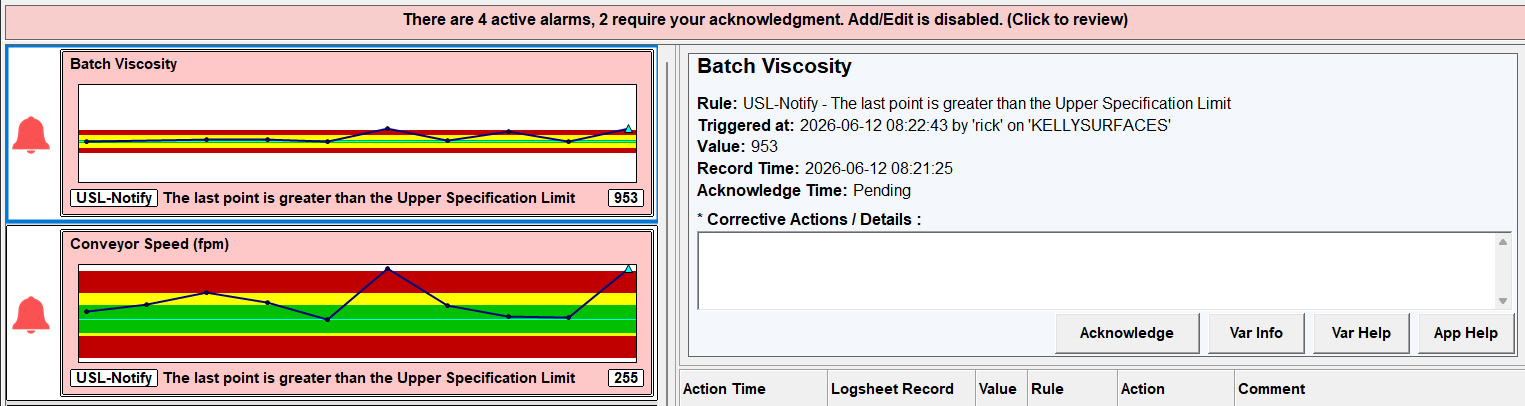
When a required acknowledgement alarm is active:
- The alarm is highlighted as requiring attention.
- Additional data entry can be restricted until the alarm is acknowledged.
- Users can document corrective actions or comments during acknowledgement.
- The acknowledgement becomes part of the alarm history.
Email Notifications
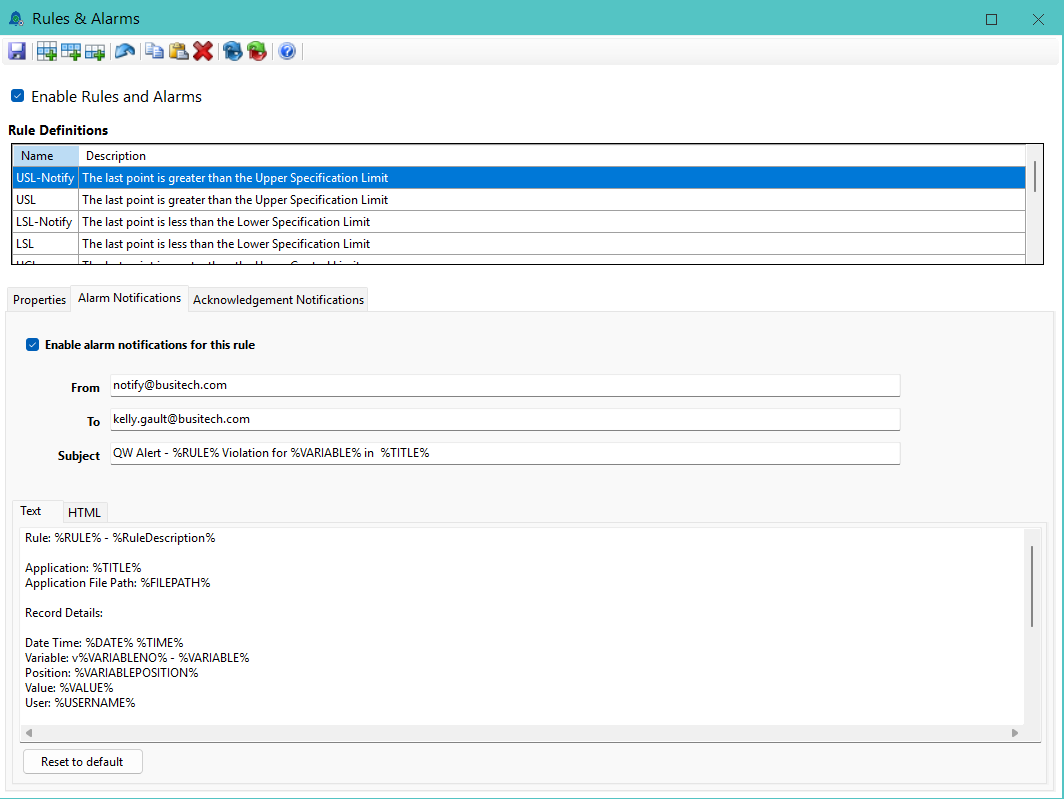
Alarms can optionally generate email notifications.
Organizations commonly use notifications to:
- Alert supervisors when critical conditions occur.
- Notify quality personnel of out-of-specification results.
- Escalate issues that require investigation.
- Create awareness of process conditions outside normal operating limits.
Notifications can be sent when an alarm is triggered, acknowledged, or both.
Monitoring Processes Without Operator Intervention
Alarms are often associated with manual data entry, but they can also be used as part of automated monitoring solutions.
When Quality Window is connected to equipment, PLCs, or other data sources through QW DataHub and QW Scheduler, data can be collected automatically using industry-standard technologies such as OPC and OPC UA.
As new data arrives, rules continue to evaluate normally. If an alarm condition is detected, Quality Window can automatically:
- Generate alarms.
- Record alarm history.
- Send email notifications.
- Trigger acknowledgement workflows.
This allows organizations to implement passive monitoring solutions where personnel are notified when attention is required rather than continuously monitoring screens, charts, or reports.
Examples include:
- Equipment operating outside normal limits.
- Environmental monitoring conditions.
- Process conditions requiring supervisor review.
- Automated quality checks and inspections.
Alarm History and Traceability
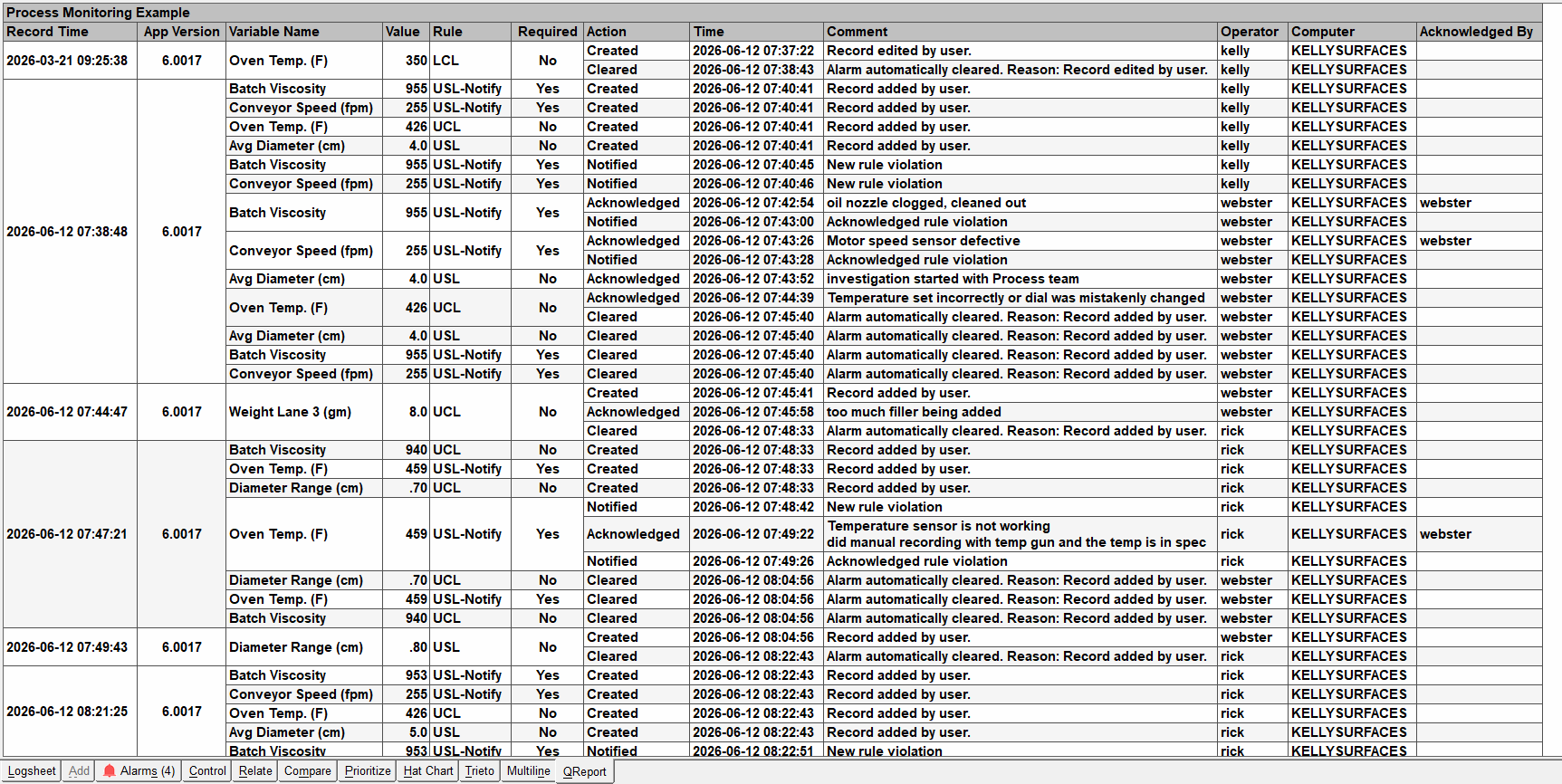
Every alarm generates a historical record that can be reviewed later.
Alarm history can include:
- When the alarm occurred.
- Which rule was violated.
- The affected variable and value.
- Comments entered during acknowledgement.
- The operator associated with the alarm event.
- The user who acknowledged the alarm.
- Notification activity associated with the alarm.
This information helps support investigations, audits, corrective actions, and continuous improvement initiatives.
Beyond Traditional SPC Monitoring
Many organizations begin by using alarms for traditional SPC applications such as specification limit violations, control limit violations, and process trends.
Over time, many discover that alarms can support much broader quality and operational workflows.
Monitoring an Entire Quality Check
Alarms do not have to be limited to individual measurements.
Some organizations create calculated variables that summarize the status of an entire inspection, batch, or quality check.
For example, a calculated variable may:
- Count the number of out-of-specification measurements in a record.
- Indicate whether all required checks have passed.
- Combine multiple quality conditions into a single status value.
Rules can then be applied to the calculated variable, allowing a single alarm to represent the overall condition of the process rather than individual measurements.
Benefits include:
- A simplified operator experience.
- Easier escalation and notification workflows.
- A single alarm representing the overall process condition.
- Reduced alarm fatigue from multiple related alarms.
Supporting Approval Workflows
Some organizations use alarms as part of formal review and approval processes.
For example:
- An operator enters data.
- An alarm is triggered.
- A supervisor or quality representative reviews the condition.
- The alarm is acknowledged and documented.
When combined with Alarm Acknowledgement Permissions, organizations can control who is permitted to acknowledge alarms and require review by designated personnel.
Triggering Operational Responses
Alarms can also be used to initiate business processes.
Examples include:
- Alerting supervisors when a process drifts out of control.
- Escalating quality issues through email notifications.
- Requiring review before additional production data is entered.
- Supporting investigations and corrective action workflows.
- Monitoring automated processes without requiring continuous operator oversight.
Getting Started
For most organizations, the easiest approach is to begin with the default SPC rules included with Quality Window.
These rules provide immediate visibility into common process conditions such as:
- Out-of-specification measurements.
- Control limit violations.
- Process trends.
- Sustained shifts from target.
As your requirements evolve, additional rules, notifications, acknowledgement requirements, automation, and workflow controls can be added to support your organization’s specific quality objectives.
Related Resources
- Alarms and Rules Administration Guide
- SPC Rules and Alarms Management
- Can Alarm Acknowledgements Be Restricted to Authorized Users?
- Configuring Email Settings for SPC Email Alerts
- Security in Quality Window
- Control Charts Explained: How to Monitor and Maintain Process Stability in Manufacturing
- Using Views to Manage Multiple Limits
- How do I restrict data entry for different user groups in Quality Window?