
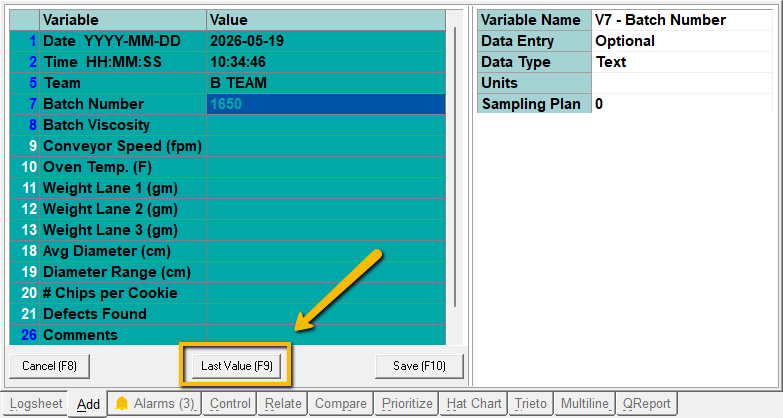
Quality Window includes a Last Value feature that allows users to quickly reuse the previously entered value during data entry by pressing the F9 key.
This feature can improve speed and consistency in repetitive data entry workflows, especially when values frequently remain unchanged between entries.
This article explains:
- What the Last Value feature does
- How to enable or disable it globally
- How to override the setting for specific users
This article references the Quality Window Security Administration Guide.
What Does the Last Value Feature Do?
When the Last Value feature is enabled, users can press the F9 key during data entry to populate the current field with the last entered value for that variable.
This can help:
- Speed up repetitive entry tasks
- Reduce typing
- Improve operator efficiency during routine entry workflows
If the feature is disabled, pressing F9 will not populate the previous value.
Enabling or Disabling the Feature Globally
Quality Window provides a global option called:
Allow F9 Previous Value on Data Entry
This setting controls the default behavior for all users.
To configure the setting:
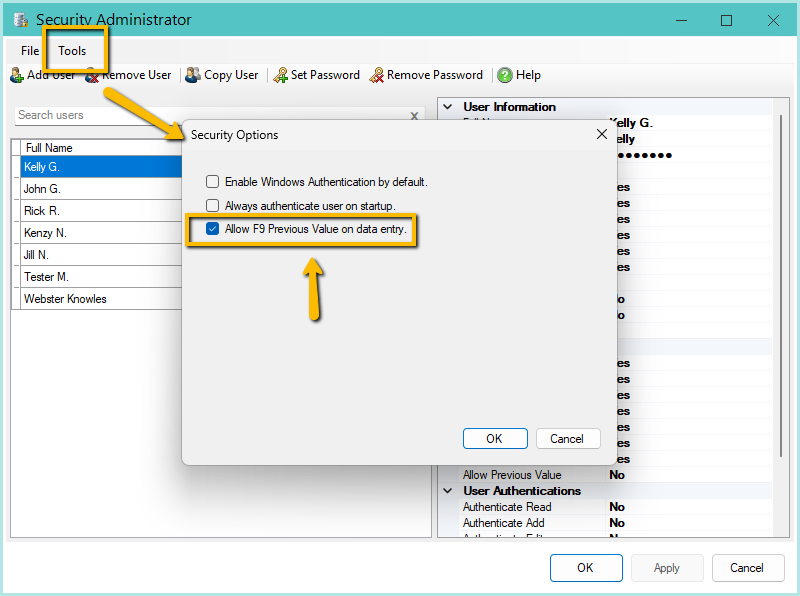
When enabled:
- By default, all users can use the F9 Previous Value feature unless an individual user permission overrides the behavior.
When disabled:
- No users can use the F9 Previous Value feature unless specifically overridden by user permissions
Overriding the Global Setting for Specific Users
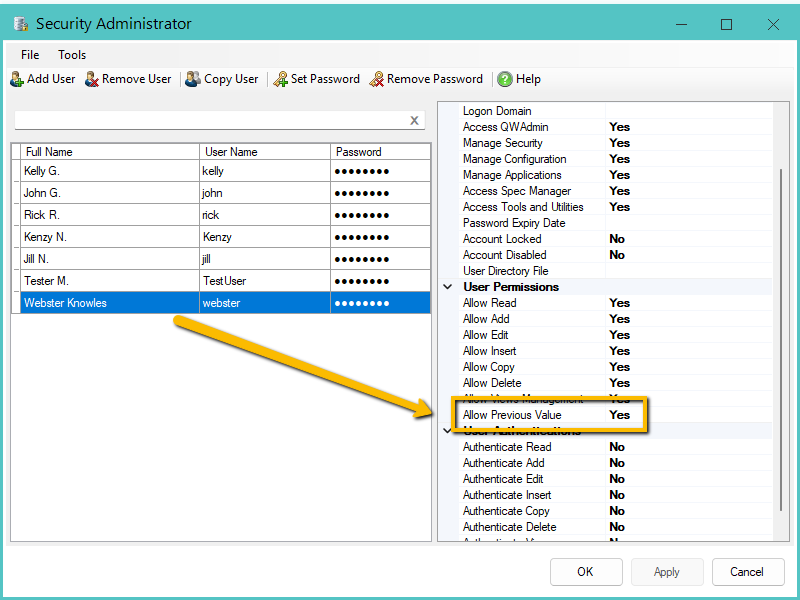
Quality Window also allows administrators to override the global setting for individual users using the:
Allow Previous Value
user permission.
This permission overrides the global setting for that specific user account.
To configure the override:
- Open the Security Administrator
- Select the user
- Locate the permission:
- Allow Previous Value
- Set the value to Yes or No
- Apply the changes
Example:
- Global setting disabled
- Specific user permission set to Yes
- Result: that user can still use F9
Or:
- Global setting enabled
- Specific user permission set to No
- Result: that user cannot use F9
Typical Configuration Approaches
Common approaches include:
| Configuration | Result |
|---|---|
| Global Enabled | All users can use F9 by default |
| Global Disabled | F9 disabled unless individually allowed |
| Global Enabled + User Override Disabled | Most users can use F9 except selected users |
| Global Disabled + User Override Enabled | Only selected users can use F9 |